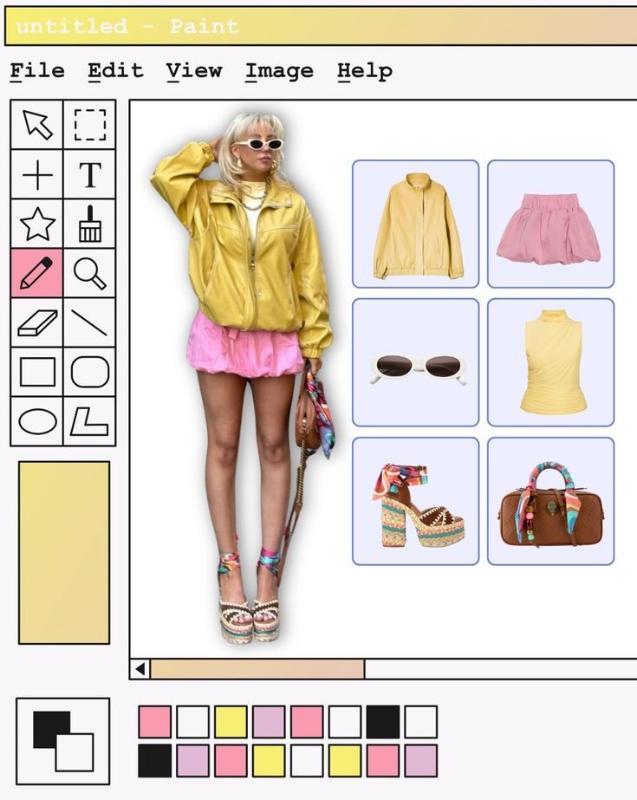
Tired of the same sterile, minimalist templates for your daily fashion showcases? Standing out on visually saturated platforms like Instagram or Pinterest requires more than just a good outfit; it demands an unforgettable aesthetic. If your Outfit of the Day posts are blending into an endless sea of beige backgrounds and basic grids, you are losing valuable engagement. Modern audiences crave personality, nostalgia, and authentic creative direction. Relying on standard modern templates signals a lack of originality, causing your unique style to get scrolled past in a heartbeat. Enter the ultimate Y2K throwback: the Retro MS Paint AI Prompt. This masterfully engineered prompt empowers you to generate stunning OOTD graphics framed entirely within a nostalgic Windows 98 or Windows XP Microsoft Paint application window. By fusing vintage digital interfaces with modern fashion, you create an irresistible visual juxtaposition. Simply plug this prompt into your favorite image generator—like Midjourney or DALL-E—to instantly produce a highly detailed, nostalgic 90s tech interface that serves as a creative outfit showcase layout. Complete with retro toolbars, classic color palettes, and pixelated canvas layouts, this aesthetic taps directly into peak internet nostalgia. Elevate your personal brand, captivate your audience, and transform your digital wardrobe into a viral masterpiece today.
Category
PhotographyCopied
101×
Tired of the same sterile, minimalist templates for your daily fashion showcases? Standing out on visually saturated platforms like Instagram or Pinterest requires more than just a good outfit; it demands an unforgettable aesthetic. If your Outfit of the Day posts are blending into an endless sea of beige backgrounds and basic grids, you are losing valuable engagement. Modern audiences crave personality, nostalgia, and authentic creative direction. Relying on standard modern templates signals a lack of originality, causing your unique style to get scrolled past in a heartbeat. Enter the ultimate Y2K throwback: the Retro MS Paint AI Prompt. This masterfully engineered prompt empowers you to generate stunning OOTD graphics framed entirely within a nostalgic Windows 98 or Windows XP Microsoft Paint application window. By fusing vintage digital interfaces with modern fashion, you create an irresistible visual juxtaposition. Simply plug this prompt into your favorite image generator—like Midjourney or DALL-E—to instantly produce a highly detailed, nostalgic 90s tech interface that serves as a creative outfit showcase layout. Complete with retro toolbars, classic color palettes, and pixelated canvas layouts, this aesthetic taps directly into peak internet nostalgia. Elevate your personal brand, captivate your audience, and transform your digital wardrobe into a viral masterpiece today.